
• New here? Register here now for access to all the forums, download game torrents, private messages, polls, Sportsbook, etc. Plus, stay connected and follow BP on Instagram @buckeyeplanet and Facebook.

Bryant

¯\_(ツ)_/¯
Staff member
We're now on Xenforo 1.3.1. There are quite a few upgrades that go along with this move. Some behind the scenes, many on the user end.

Spoiler tags! Just wrap what you please in spoiler and /spoiler bbcode (with square brackets, per the norm)
MultiQuote (it's a fantastic implementation -- select the posts you want to quote, go down to the message editor, hit insert quotes, rearrange the posts as you please, and in they go when you hit submit).
Smiley management/organization (we'll need to do some work behind the scenes on that one)
Moderation Improvements
Full ipv6 support


There's a lot more, but those are the biggies.

As with any upgrade, there may be unintended consequences. I've thoroughly tested post-upgrade and watched for errors and we're clean, but if you notice something plainly wrong, please let me know here.

Next up: Search Engine
Coming soon: Survivor Pools
 
Last edited:
Moderation Improvements

Screen Shot 2014-05-03 at 7.40.53 PM.png

anchorman.gif
 
Upvote 0
Edit: Works good. But IE11 users that had previously added a compatibility view exemption must edit their list to explicitly remove it, otherwise they still don't get the Rich Text toolbar.

Thanks a ton for checking. Wanted to make sure someone who had experienced the old issue was able to confirm it's resolved with XF's workaround for IE's handling.

@DiamondBuck
@utgrad73
@ScriptOhio
@MONTbigBuck
@jlb1705
@NJ-Buckeye

Those are the usernames that participated in the "Can't post or reply" thread, either through responses or likes. IF you completed one or more of the steps in that thread (linked above), you can safely undo them to enjoy the rich text editor.
 
Upvote 0
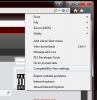
For IE11 users, the compatibility view option is beneath the menu tree under the gear icon in the top right. Make sure you remove buckeyeplanet.com if previously added to see the rich text toolbar and attachment buttons.

Untitled.png
 
Upvote 0
We're now on Xenforo 1.3.1. There are quite a few upgrades that go along with this move. Some behind the scenes, many on the user end.

Spoiler tags! Just wrap what you please in spoiler and /spoiler bbcode (with square brackets, per the norm)
MultiQuote (it's a fantastic implementation -- select the posts you want to quote, go down to the message editor, hit insert quotes, rearrange the posts as you please, and in they go when you hit submit).
Smiley management/organization (we'll need to do some work behind the scenes on that one)
Moderation Improvements
Full ipv6 support


There's a lot more, but those are the biggies.

As with any upgrade, there may be unintended consequences. I've thoroughly tested post-upgrade and watched for errors and we're clean, but if you notice something plainly wrong, please let me know here.

Next up: Search Engine
Coming soon: Survivor Pools

Edit: Works good. But IE11 users that had previously added a compatibility view exemption must edit their list to explicitly remove it, otherwise they still don't get the Rich Text toolbar.

Took me a try or two, but got the multiqoute...
 
Upvote 0
I have a question that I am not sure it belongs here, but didn't think it needed its own thread.

I have been receiving email updates for our NCAA league every time someone posted to it immediately. Two days ago was the last one I've received despite several posts over the same time period. I checked my email and it's correct, I made sure my contact information allowed for emails to be sent to me.

Is there a super secret option that I've missed? In the old forum there was the thread options menu where you could change the email options but I just can't seem to find it
 
Upvote 0
There's a "Watch Thread" link at the top of each thread. If you're just looking for the on/off toggle for a given thread, that's it. Beyond that there are some global alert and contact settings in your control panel.
 
Upvote 0
There's a "Watch Thread" link at the top of each thread. If you're just looking for the on/off toggle for a given thread, that's it. Beyond that there are some global alert and contact settings in your control panel.
Yeah, I'm familiar with it. My question is why have I stopped receiving the emails? I didn't change any settings and they just stopped a few days ago. @MD Buckeye just posted to the thread again last night and I didn't get notified. That thread is the only one I had set up to immediately email so I don't know if it's just something in that thread only or not.
 
Upvote 0
Back
Top