This link at Microsoft may help. https://answers.microsoft.com/en-us...d/69371e0d-c4d5-43b0-b89b-5bcd7d16654b?auth=1
Thanks for the links. No dice.
We'll see if the guy can help tomorrow.
Upvote
0

Follow along with the video below to see how to install our site as a web app on your home screen.
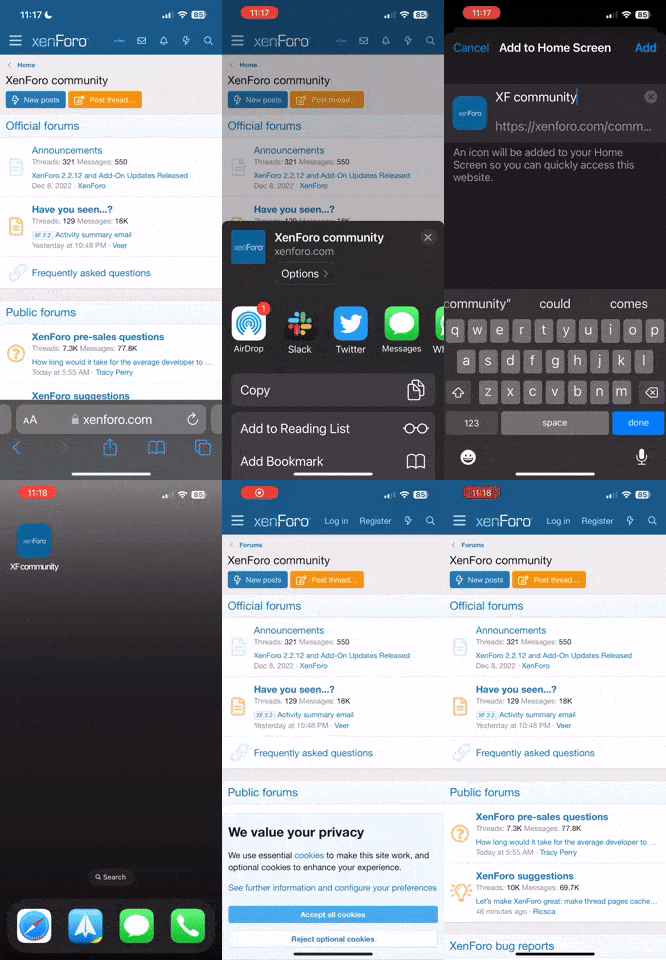
Note: This feature currently requires accessing the site using the built-in Safari browser.

This link at Microsoft may help. https://answers.microsoft.com/en-us...d/69371e0d-c4d5-43b0-b89b-5bcd7d16654b?auth=1


Setting up a local account will probably solve your login issue, but after having several occurances of the Start button issue, I'm not sure if that will fix it. That problem is fairly common, usually after an update. Download the troubleshooter here:
https://support.microsoft.com/en-us...ubleshoot-problems-opening-start-menu-cortana

If he didn't do it already, you can set up a local account yourself quite easily. In Settings, go to Accounts-Sign in options-use local account. Only take a minute. I used to always use a local account in the early versions of Windows 10, because for all of Microsoft's talk of how secure it is, I never liked how it displayed my email address on the login screen!