


• New here? Register here now for access to all the forums, download game torrents, private messages, polls, Sportsbook, etc. Plus, stay connected and follow BP on Instagram @buckeyeplanet and Facebook.

RUMOR: Major BP problem

Thump

Hating the environment since 1994
  • For about the last year, whenever I post on BP from home, when I scan down to edit or view a post of mine, I can't scroll all of the way down to my post. It stops about four posts above mine and I can't scroll the entire page.

    I tried installing firefox to see if that would fix the issue but I still had the same problem.

    If someone can tell me how to do a screen capture I can add that to show you but I have no idea how to fix it. Deleting cookies, disk cleanup, etc...nothing seems to help.
     
    Thump;1659591; said:
    For about the last year, whenever I post on BP from home, when I scan down to edit or view a post of mine, I can't scroll all of the way down to my post. It stops about four posts above mine and I can't scroll the entire page.

    I tried installing firefox to see if that would fix the issue but I still had the same problem.

    If someone can tell me how to do a screen capture I can add that to show you but I have no idea how to fix it. Deleting cookies, disk cleanup, etc...nothing seems to help.

    Using IE goto Tools -> Internet Options.

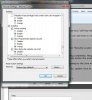
    Click the Security Tab and at the bottom under the section "Security Levels for This Zone" click the "Custom level ..." button. At the bottom of the list, one of the last main categories covers scripting (Java). The heading will be "Scripting -> Active Scripting." Change this to disable. (See attached)

    You will need to restart IE. This will shutoff Java embedding completely. Reopen and try BP then. A lot of things won't work correctly (ads, the dropdown menu to change threads at the bottom of the screen, the embed icons when posting for adding images and links), but it should help isolate the problem with your browsing. Since the problem occurs in both Firefox and IE, I'm guessing it's going to be the Java engine itself, since it would unlikely be a third party plugin that wouldn't know about Firefox, which you installed after the problem became evident in IE.

    Try the above to see if it makes the problem go away. If so, then update Java to v6.18, reboot, then go back into IE and do the reverse of the steps above (reenable active scripting to turn everything back on). Also, I'd encourage uninstalling any toolbar helpers if you have any (Yahoo, Google, Kiwee, etc ...). These are generally all garbage that cause far more problems with Web browsing than they fix, and open you PC to lots of exploits that MalWare & Antivirus scanner cannot detect.

    Download Free Java Software - Sun Microsystems
     

    Attachments

    • scripting.jpg
      scripting.jpg
      48 KB · Views: 5
    Upvote 0
    Oh, and if this problem has been going on for a year, make sure you've updated to IE 8 + Windows Live, and have all recent service packs installed (SP3 for XP, SP2 for Vista, etc ...).
     
    Upvote 0
    Dryden;1659610; said:
    Oh, and if this problem has been going on for a year, make sure you've updated to IE 8 + Windows Live, and have all recent service packs installed (SP3 for XP, SP2 for Vista, etc ...).

    When I tried to install IE 8, it shut my computer down and would not allow me on the web.
     
    Upvote 0
    Thump;1659621; said:
    How can I shrink sown my screen shot to small enough to upload?

    I think you're screwing with all of us...but in case you're not...

    In MS Paint, you can edit drawing attributes and shrink down the image - just shrink horiz and vert the same persentage, else your drawing will skew...
     
    Upvote 0
    Back
    Top