
Install the app
How to install the app on iOS
Follow along with the video below to see how to install our site as a web app on your home screen.
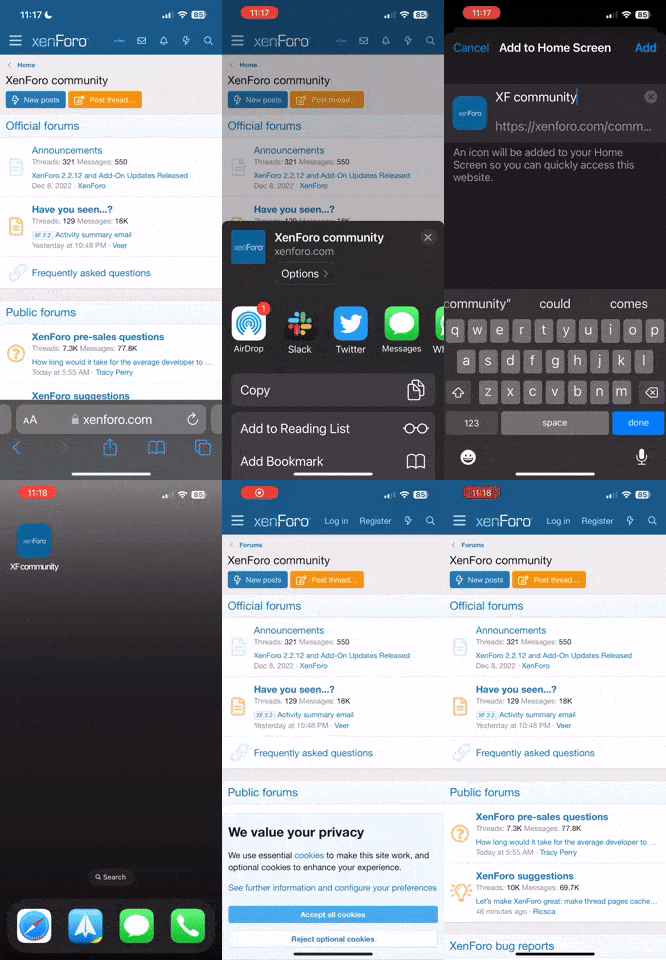
Note: This feature currently requires accessing the site using the built-in Safari browser.
-
New here? Register here now for access to all the forums, download game torrents, private messages, polls, Sportsbook, etc. Plus, stay connected and follow BP on Instagram @buckeyeplanet and Facebook.
You are using an out of date browser. It may not display this or other websites correctly.
You should upgrade or use an alternative browser.
You should upgrade or use an alternative browser.
99.7
- Thread starter scarletandgrey
- Start date




jimotis4heisman
Banned

an apple school?
(since that will most likely lead to a wazzu or u dub joke)
what brand of puters does your school have?
Upvote
0

jimotis4heisman;761393; said:
an apple school?
(since that will most likely lead to a wazzu or u dub joke)
what brand of puters does your school have?
I know what you meant.

No, we have PC's.
Upvote
0



Thump;761355; said:I know. Just wish it worked still.
How familiar are you with how the internet and the firewall in your school are set up?
If the proxy settings changed when they updated your computer, that could explain why it doesn't work because now the feed is getting blocked.
Upvote
0
BuckeyeMike80;761398; said:How familiar are you with how the internet and the firewall in your school are set up?
If the proxy settings changed when they updated your computer, that could explain why it doesn't work because now the feed is getting blocked.
It's not the firewall.
The player buffers and then just says "Completed" and no music plays.
Upvote
0
hmmmmmThump;761399; said:It's not the firewall.
The player buffers and then just says "Completed" and no music plays.
Are you running Vista or XP?
There might be some settings in Windows Media Player that need to be adjusted.
PS: I had to do this at work myself to listen to Blue Jackets and Red Wings games.
Upvote
0
open your media player and go under Tools -----> Options.
Go to the Network tab and try to get it as close to the picture below (I have my home computer set up the same way)

If that doesn't work, then I can't help ya.....at least without getting hands on with the computer, and your IT department might not like that one
Go to the Network tab and try to get it as close to the picture below (I have my home computer set up the same way)
If that doesn't work, then I can't help ya.....at least without getting hands on with the computer, and your IT department might not like that one
Upvote
0
BuckeyeMike80;761405; said:hmmmmm
Are you running Vista or XP?
There might be some settings in Windows Media Player that need to be adjusted.
PS: I had to do this at work myself to listen to Blue Jackets and Red Wings games.
XP.
It doesn't use Windows Media Player to listen. If you go to Sirius's website and login, they have their own player to listen to their stations.
Upvote
0
OSU_Buckguy;761407; said:my bet is that you're using firefox as your browser.
No, just IE.
It worked earlier this year.
Upvote
0

OSU_Buckguy
Head Coach
try the wmp plug-in or even the new player download (under firefox): link
Upvote
0
Thump;761429; said:XP.
It doesn't use Windows Media Player to listen. If you go to Sirius's website and login, they have their own player to listen to their stations.
Actually the browser window is using Media Player as a plug in.

2. What is the recommended hardware and software for using the SIRIUS player? For the best experience, we recommend:
- PC ? Windows 98, or NT 4 and above
- Mac ? OS 9.0 or higher
- Connection Speed ? ISDN or higher.
- Browser ? Safari 1.0, Netscape 7 and Internet Explorer 5.5 or higher, AOL version 5.0 or higher
- Flash - The latest version. Download it here.
- Windows Media Player ? Windows Media Player Version 9 or greater is required. Download it here.
Upvote
0

Buckeye Buh Nim
Loving the Bucks since 1969
I remember way back when 99.7 was classic rock. Then one weekend they canned all the DJ's, they put in Stairway to Heaven and put it on repeat. That was the only song they played for a week.
After the week was up, they had changed formats to 99.7 the Blitz (or the Butz as it appeared on their old bilboards)
good times. good times.
After the week was up, they had changed formats to 99.7 the Blitz (or the Butz as it appeared on their old bilboards)
good times. good times.
Upvote
0